Contact sales pricing: find it
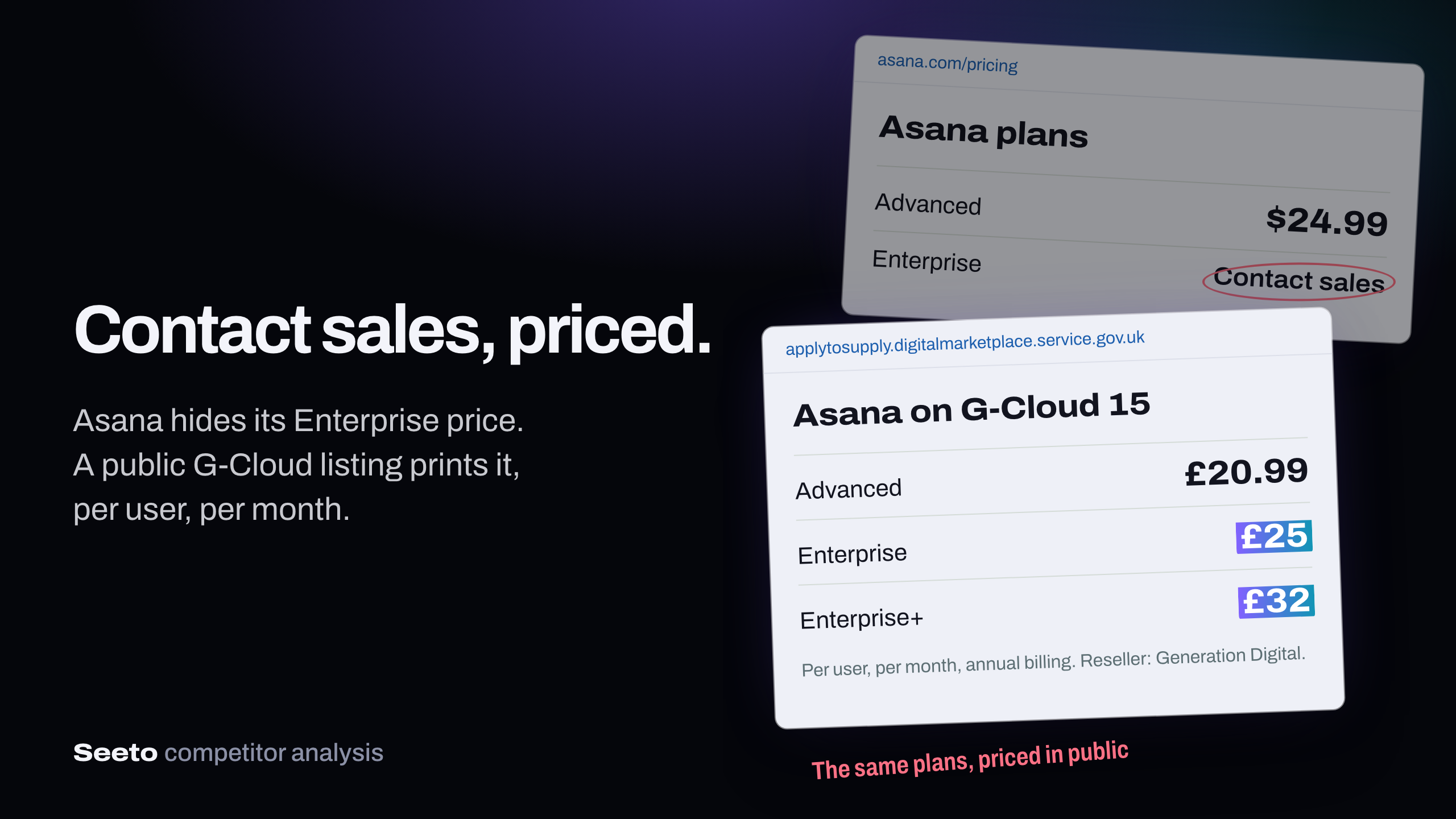
Contact sales pricing is often published, only not on the competitor's own pricing page. When a competitor's enterprise plan says "Contact sales", look in public procurement listings, such as the UK's G-Cloud catalogue. Resellers there publish pricing documents with per-user enterprise prices, minimum seats and contract terms. For Asana and Miro, those documents give the numbers their own pages hide.
This guide shows where those numbers live, how to read them, and how to turn a reseller's list price into an estimate you can put in front of your team.
Contact sales pricing is public
A SaaS company hides its top plan for good reasons. The deal size is large, the discount depends on the buyer, and a public number anchors every negotiation. On Asana's pricing page, Starter costs $10.99 and Advanced costs $24.99 per user per month on annual billing. Enterprise and Enterprise+ show only "Contact sales".
The usual advice is to ask a friend, book a demo under a false name, or read forum posts with old quotes. Each of these is slow, and a quote from a forum has no date and no source you can check.
There is a better source for many vendors. Public sector buyers must buy from catalogues with prices on them. The vendor, or a reseller of the vendor, has to write those prices down. Anyone can read them.
G-Cloud lists prices
G-Cloud is the UK framework that public bodies use to buy cloud software. The Government Commercial Agency's G-Cloud 15 page lists access to over 50,000 services and over 4,000 suppliers, and names "transparent, upfront pricing and terms" as a benefit. G-Cloud 15 runs for four years from 6 August 2026. (The Crown Commercial Service became the Government Commercial Agency on 1 April 2026, so older guides use the old name.)
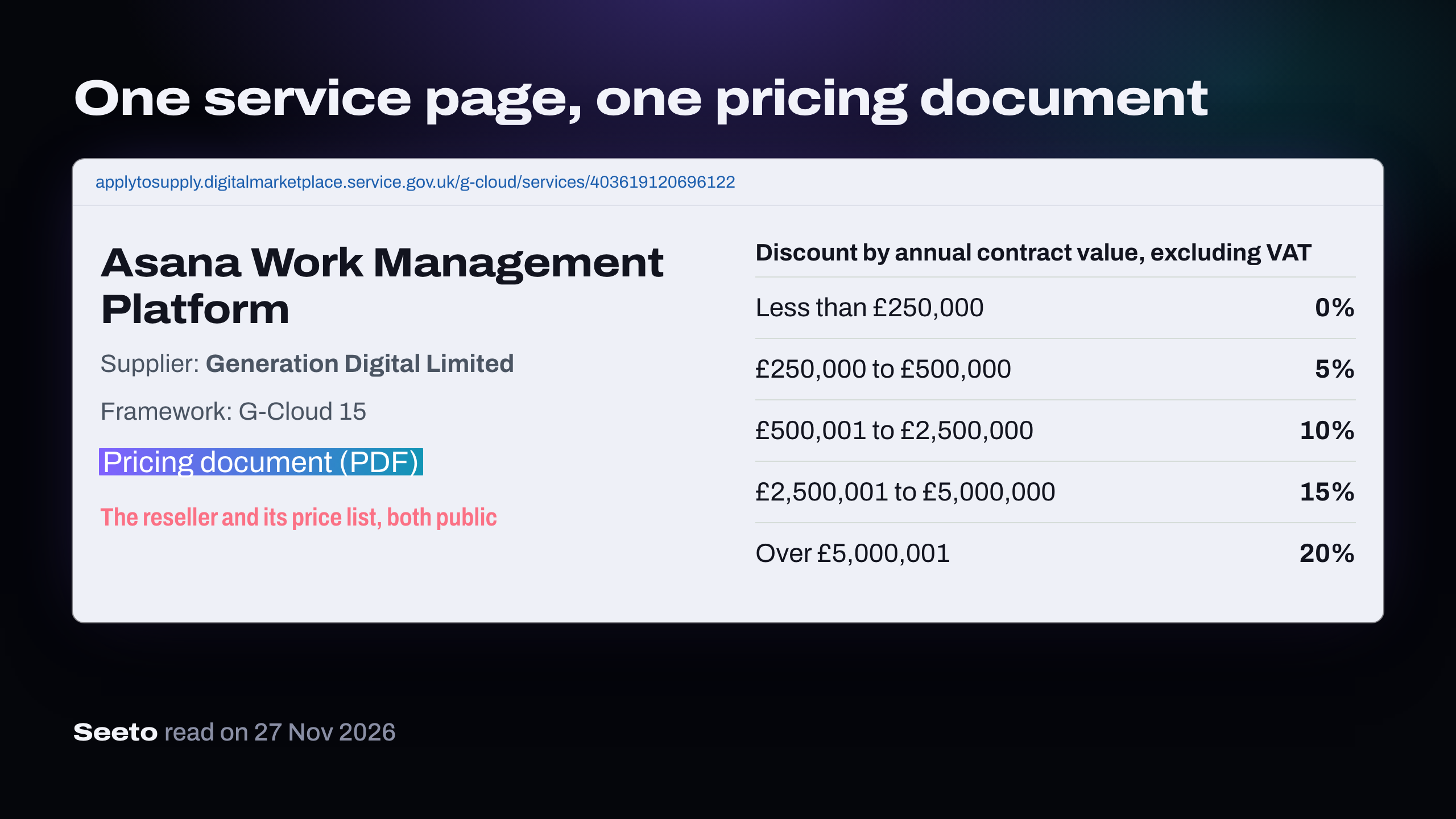
Each service has a page on the Digital Marketplace. Each page links a pricing document, a service definition and the terms. The pricing document is a PDF, and for software it often holds a per-user price for each plan.
To search it:
- Open the Digital Marketplace G-Cloud search.
- Type the competitor's name and choose the cloud software lot.
- Open each service that sells the product itself, not only consultancy around it.
- Open the pricing document. Note the supplier, the file date in the link, and every number.
What the listings say
Asana's top plans are a good test. The reseller Generation Digital lists the Asana Work Management Platform on G-Cloud 15. Its pricing document gives five plans in pounds, per user per month: Personal £0, Starter £9.49, Advanced £20.99, Enterprise £25 and Enterprise+ £32. The same document prices add-ons for Enterprise clients, such as Permissions Management and Compliance Management at £5 per user per month each.
Miro is the second test. Miro's pricing page lists Starter at $8 and Business at $20 per member per month on annual billing. Its Enterprise plan says "Custom pricing—from 30 members". The Miro listing from the same reseller has a pricing document that prices Enterprise at £225 to £270 per user per year, with at least 30 users and contract terms of 12, 24 or 36 months.
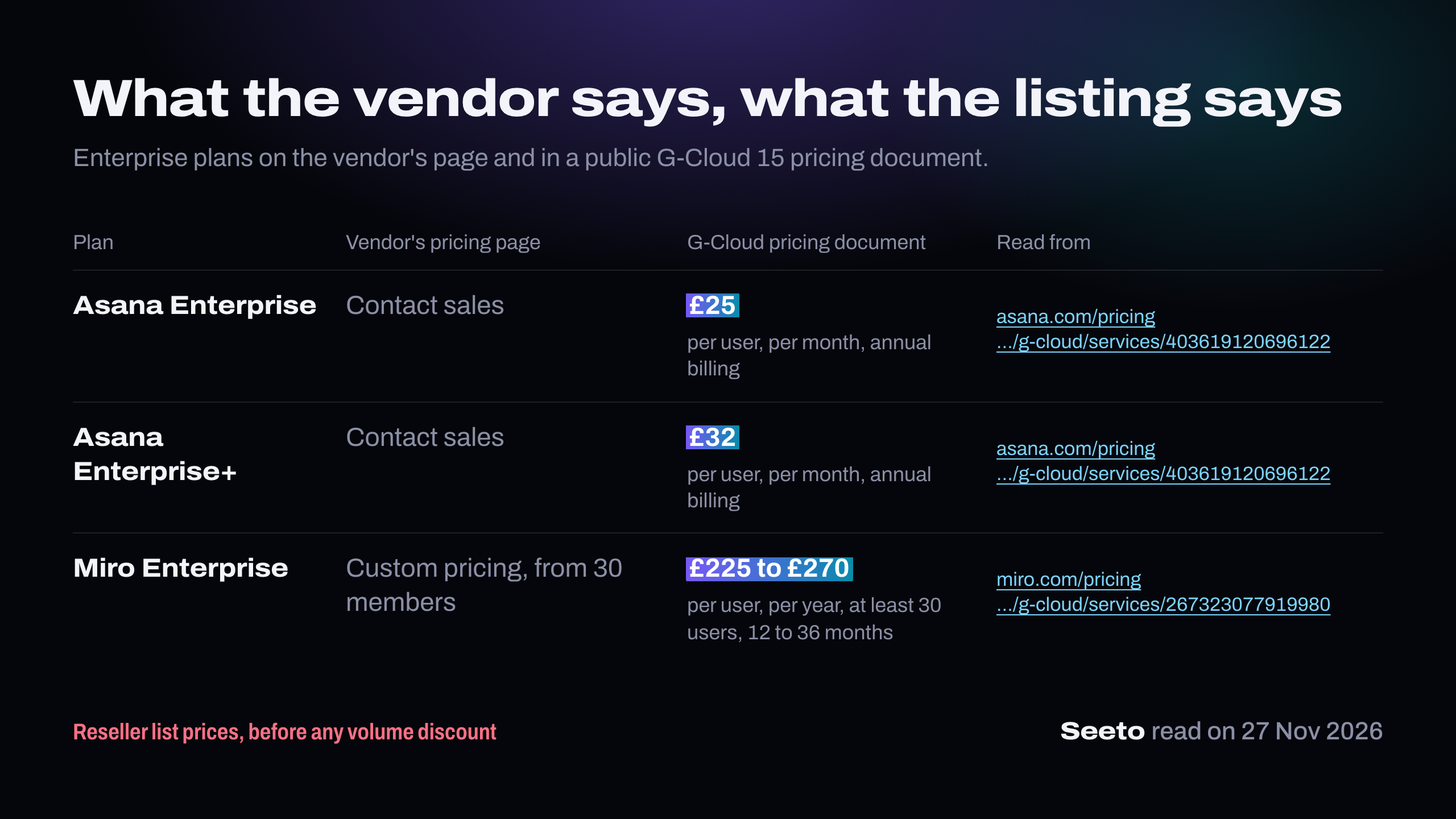
Note the match on Miro: both the vendor's page and the reseller's document say 30 seats. That match tells you the document describes the real plan, not a reseller's own bundle.
The listing's discount table
The listing page holds a second fact that a pricing page never shows: the discount by contract size. Each G-Cloud service states a discount percentage by annual contract value, excluding VAT. On Generation Digital's Asana and Miro listings, the bands are: 0% below £250,000, 5% from £250,000 to £500,000, 10% from £500,001 to £2,500,000, 15% from £2,500,001 to £5,000,000, and 20% above £5,000,001.
Another reseller can say something different. BDQ's Asana listing states 0% in every band. So read each reseller's table, and treat the bands as one channel's public terms, not the vendor's policy.
For most deals that you lose to a competitor, the contract value sits below £250,000. In that band, both listings give no published discount. Any discount your buyer got came from a negotiation, not from a price list.
Turn a list price into an estimate
A reseller price is in pounds and comes from one channel. Your buyer pays in dollars, directly. Do not convert the currency and stop there. Use the ratio between the plans instead. A reseller usually keeps the vendor's ladder.
Here is the worked example for Asana:
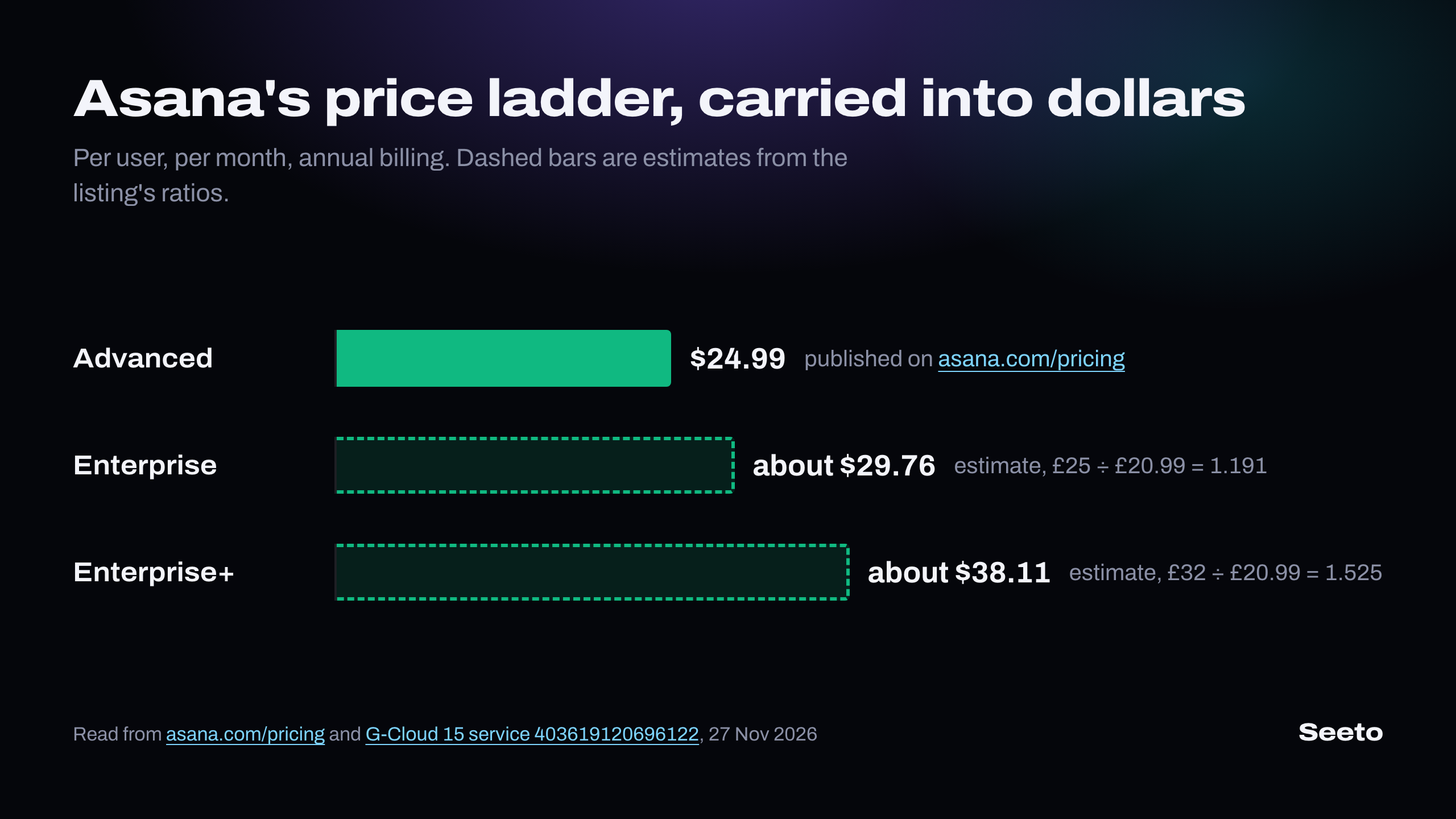
- Find a plan with a public price in both sources. Advanced is £20.99 in the document and $24.99 on asana.com.
- Divide each hidden plan by that plan in the document. Enterprise: £25 ÷ £20.99 = 1.191. Enterprise+: £32 ÷ £20.99 = 1.525.
- Multiply the public dollar price by each ratio. Enterprise: $24.99 × 1.191 = about $29.76. Enterprise+: $24.99 × 1.525 = about $38.11.
- Write the result as a range and name its source, for example "Enterprise list, about $30 per user per month, from the G-Cloud ladder".
The same method works for a floor. Miro's Enterprise needs at least 30 users. At £225 to £270 per user per year, the smallest Enterprise contract costs 30 × £225 = £6,750 to 30 × £270 = £8,100 a year in this channel.
Compare that with Business: $20 × 12 = $240 per member per year on miro.com. Now your sales team knows the entry ticket for the top plan, and the jump from the plan below it.
Where else hidden prices appear
The same idea works wherever a buyer needs a written price:
- Other public catalogues. Many governments buy from catalogues with set prices. Search for the product name with the catalogue's name.
- Cloud marketplaces. Some vendors sell through the marketplaces of large cloud providers, and some of those listings show contract prices.
- Resellers' own sites. A reseller that sells to small buyers often publishes a price list that the vendor does not.
- The competitor's help centre. Billing articles often name seat minimums, overage rates and add-on prices that the pricing page leaves out. We covered this in the numbers competitors publish by accident.
Mistakes to avoid
- Treating a list price as a deal price. A reseller list price is a ceiling for one channel. Large buyers pay less.
- Converting currency only. Exchange rates and VAT rules make a direct conversion wrong by more than the gap you want to measure. Use the ratio method above.
- Reading a consultancy listing. Many G-Cloud services sell training or setup around a product. Their day rates tell you nothing about the licence price.
- Using a stale document. The date is in the PDF's file name. A document from last year can describe plans that no longer exist.
- Keeping the number without its source. A price in a battle card with no link becomes a rumour within a month. Read why annual discounts change what you compare before you put two prices side by side.
How Seeto tracks it
Finding one hidden price takes an hour. Keeping five competitors' prices current takes a process. Seeto does that work.
You paste your URL and your competitors' URLs, and an agent reads their real pages. In 5 to 15 minutes you get a pricing comparison, a features matrix, battle cards and the rest of the report. Every fact carries the page it came from, so a price in your battle card always links to its source.
On Pro, Seeto runs the analysis again on a schedule and compares it with the previous run. When a competitor changes a plan, adds a seat minimum or removes a price, the report shows what changed and on which page. The enterprise numbers you found in a pricing document then sit next to a public ladder that stays current. See the plans on the pricing page.
Questions on prices
Is a G-Cloud price legal?
Yes. The UK government publishes G-Cloud listings and their pricing documents for any reader. You read a public page, the same as a buyer does.
Is a reseller's price real?
No. It is a public ceiling for one channel, before volume discounts and negotiation. Use it to find the ladder and the shape of the deal, not the final number.
What if my competitor is not on G-Cloud?
Look for its resellers first, because a reseller often lists products the vendor does not list itself. Then look at other public catalogues and at the competitor's own help pages and order forms.
How often do prices change?
Pricing documents carry a date in their file name. Suppliers can update them while a framework is open, so read the date before you use the number, and read the document again each quarter.
Start with one competitor
Pick the competitor that shows "Contact sales" on its top plan. Search its name on G-Cloud today, open the pricing document, and write down the ladder with its date and address. Then let Seeto watch the public half of the picture for you: start a free analysis with that competitor's URL.