Usage-based pricing: read the overage first
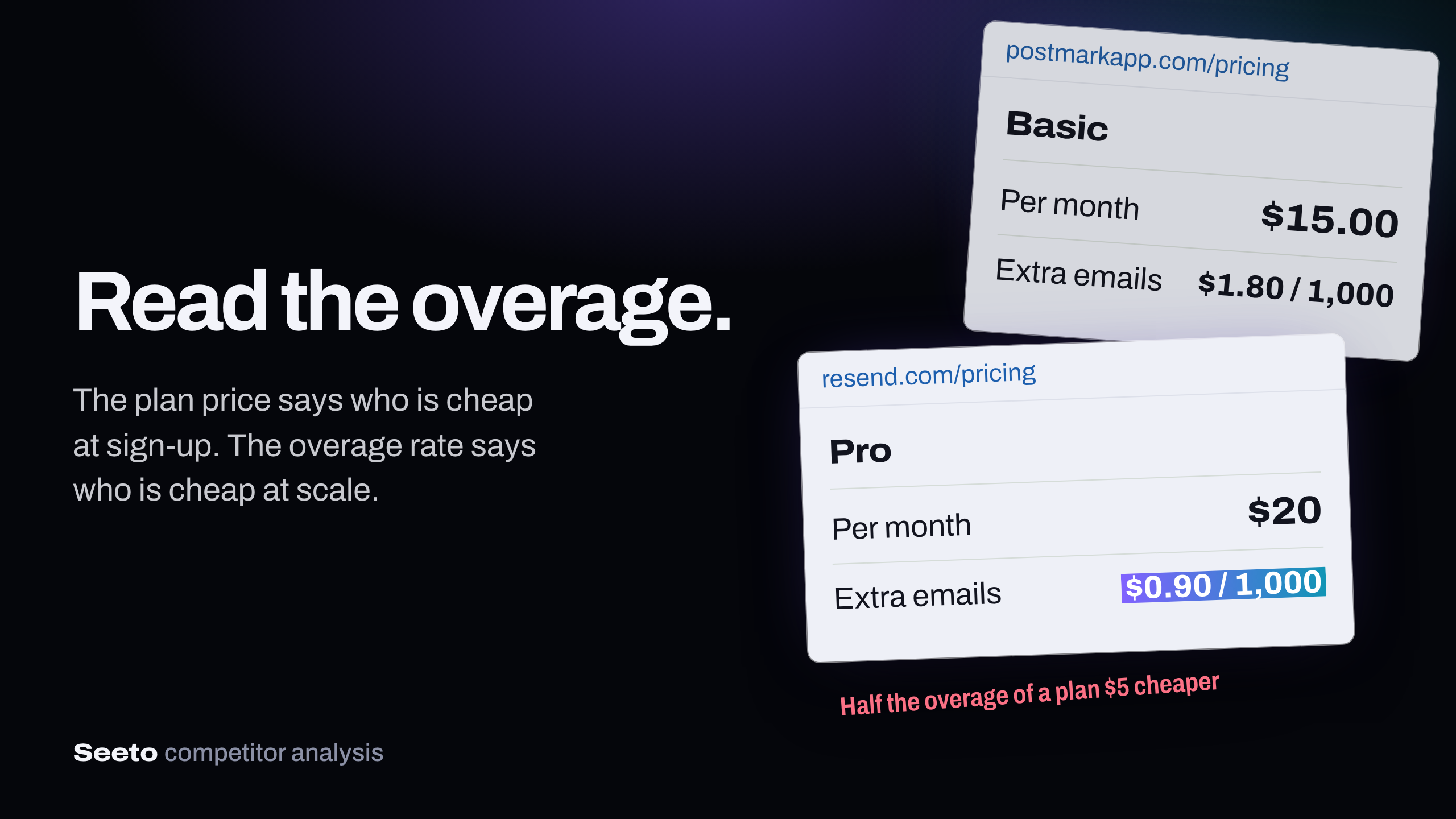
In a usage-based pricing comparison, compare the overage rate, not the plan price. The plan price tells you who is cheapest on the day a customer signs up. The overage rate tells you who is cheapest once that customer grows. Most competitor pricing tables show only the first number, and they rank your rivals in the wrong order.
The plan price is the wrong number
Open three pricing pages in one category and you will see three plan prices in large type. The rate for each unit past the allowance sits in smaller type, often in a second line under the plan, or in the FAQ.
That smaller line is the price your best customers pay. A customer who stays inside the allowance pays the plan price. A customer who grows past it pays the plan price once and the overage on every unit after that. The customers who grow are the ones you most want to win.
So a comparison table with one column for "price" measures the customer you least care about. I think this is the most common error in competitor pricing research for usage-based products, and it is easy to fix.
A usage-based pricing comparison
Take transactional email. Postmark's pricing page lists Basic at $15.00 a month, starting at 10,000 emails, with extra emails at $1.80 per 1,000. Pro is $16.50 with extra emails at $1.30 per 1,000. Platform is $18.00 with extra emails at $1.20 per 1,000.
Resend's pricing page lists Pro at $20 a month for 50,000 emails, with extra emails at $0.90 per 1,000. Its FAQ says overages are billed in buckets of 1,000 emails, and only when a paid team turns on pay-as-you-go.
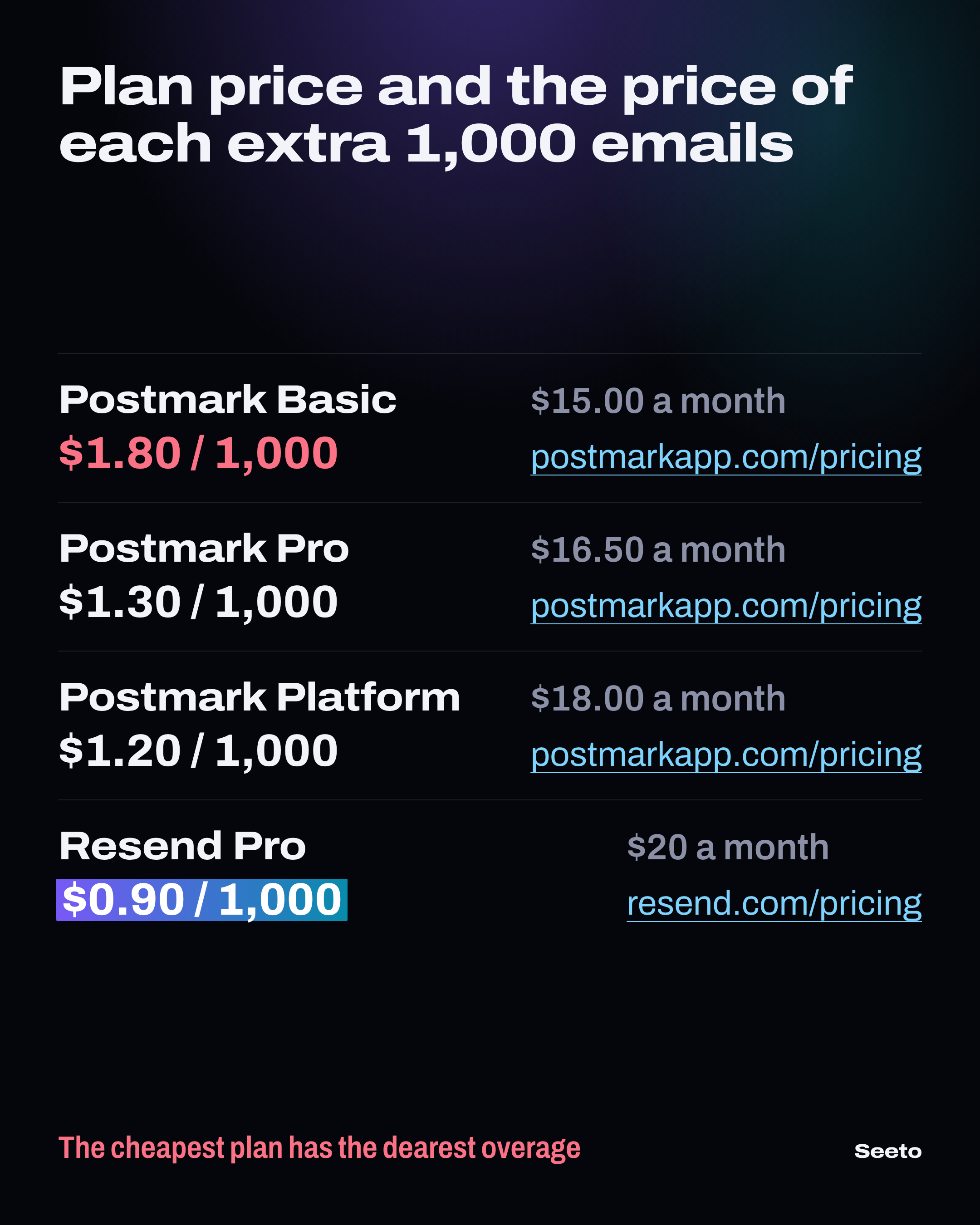
Read the plan column and Postmark Basic is the cheapest by $5. Read the overage column and Resend Pro charges half as much per extra email. The two columns rank the plans in opposite orders.
The bill at 80,000 emails
Here is the arithmetic for a customer on each entry tier who lets the overage run. Postmark's page sells larger monthly tiers too, so a customer can move up. The point is what the published rates charge when they do not.
At 40,000 emails a month:
- Postmark Basic: $15.00 + 30 × $1.80 = $69.00.
- Resend Pro: 40,000 is inside the 50,000 allowance, so $20.
At 80,000 emails a month:
- Postmark Basic: $15.00 + 70 × $1.80 = $141.00.
- Postmark Pro: $16.50 + 70 × $1.30 = $107.50.
- Postmark Platform: $18.00 + 70 × $1.20 = $102.00.
- Resend Pro: $20 + 30 × $0.90 = $47.00.
The plan that was $5 cheaper at sign-up is $94 dearer at 80,000 emails. If you sell against either of them, the number to put in front of your sales team is the second one.
Same allowance, different overage
The gap is not only between competitors. One vendor can sell two plans with the same allowance and very different overage rates.
Algolia's pricing page lists Grow and Grow Plus. Both include 10K search requests a month. Past that, Grow charges $0.50 per additional 1K search requests, and Grow Plus charges $1.75. Both charge $0.40 per additional 1K records past 100K.
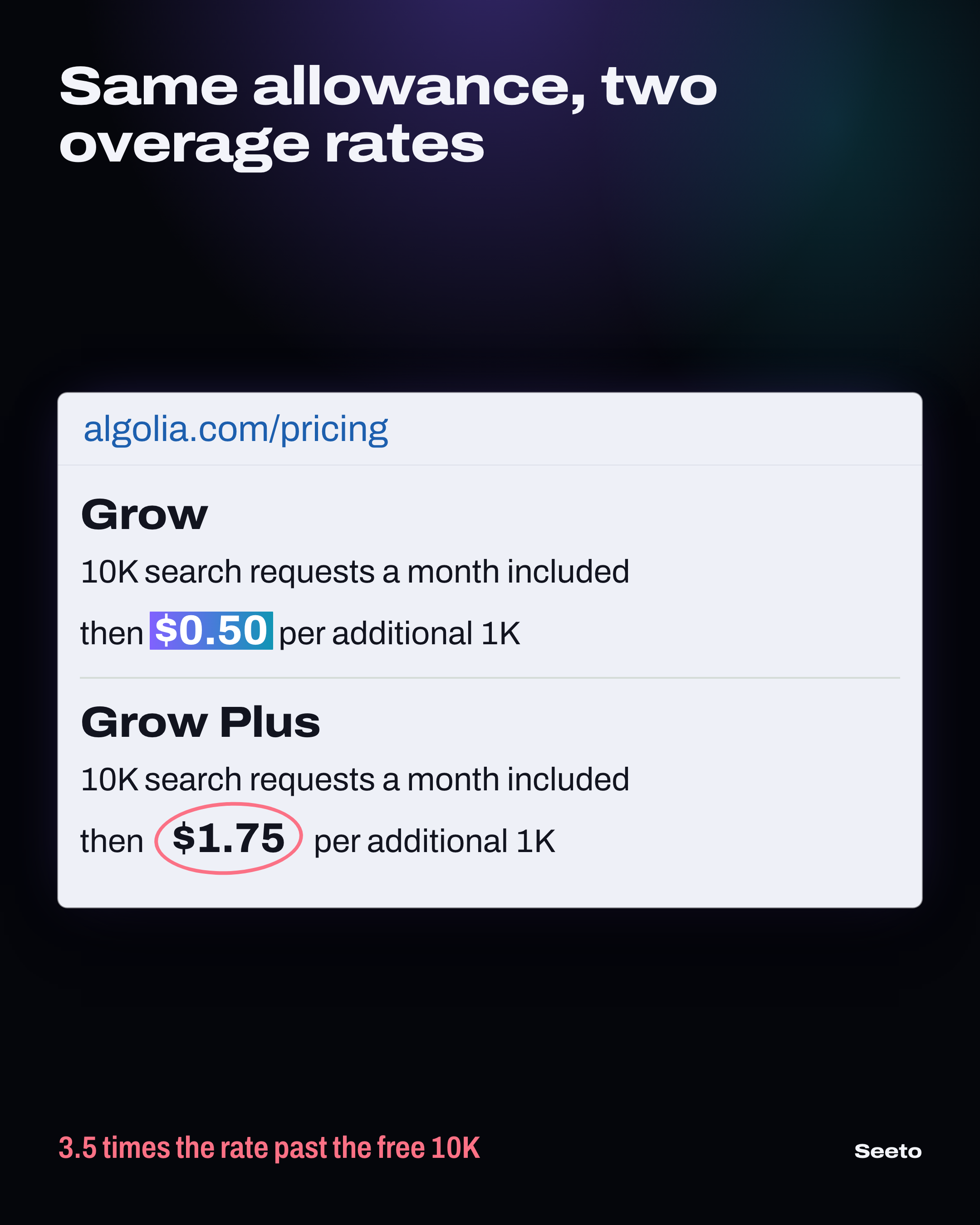
At 200K search requests a month, Grow costs 190 × $0.50 = $95 in search overage. Grow Plus costs 190 × $1.75 = $332.50. The allowance is the same. The overage rate is the product decision: Algolia charges for the AI features in Grow Plus through the price of each extra search.
That is a fact a positioning team can use. If your product has AI search in its base rate, the overage line on a rival's page is where you prove it.
Overage shows the strategy
The overage rate is not an accident of the price sheet. Vendors use it to push customers into commitments. In an essay on overages, a16z partner Joe Morrissey describes go-to-market leaders who use overages to get customers to commit to higher spend up front, and argues that this friction makes renewals harder.
So when a competitor changes an overage rate, read it as a signal:
- A lower overage rate says they want growing accounts to stay on self-serve.
- A higher overage rate says they want those accounts to talk to sales and sign a commitment.
- A new meter, such as a price per AI outcome, says where they think the value moved.
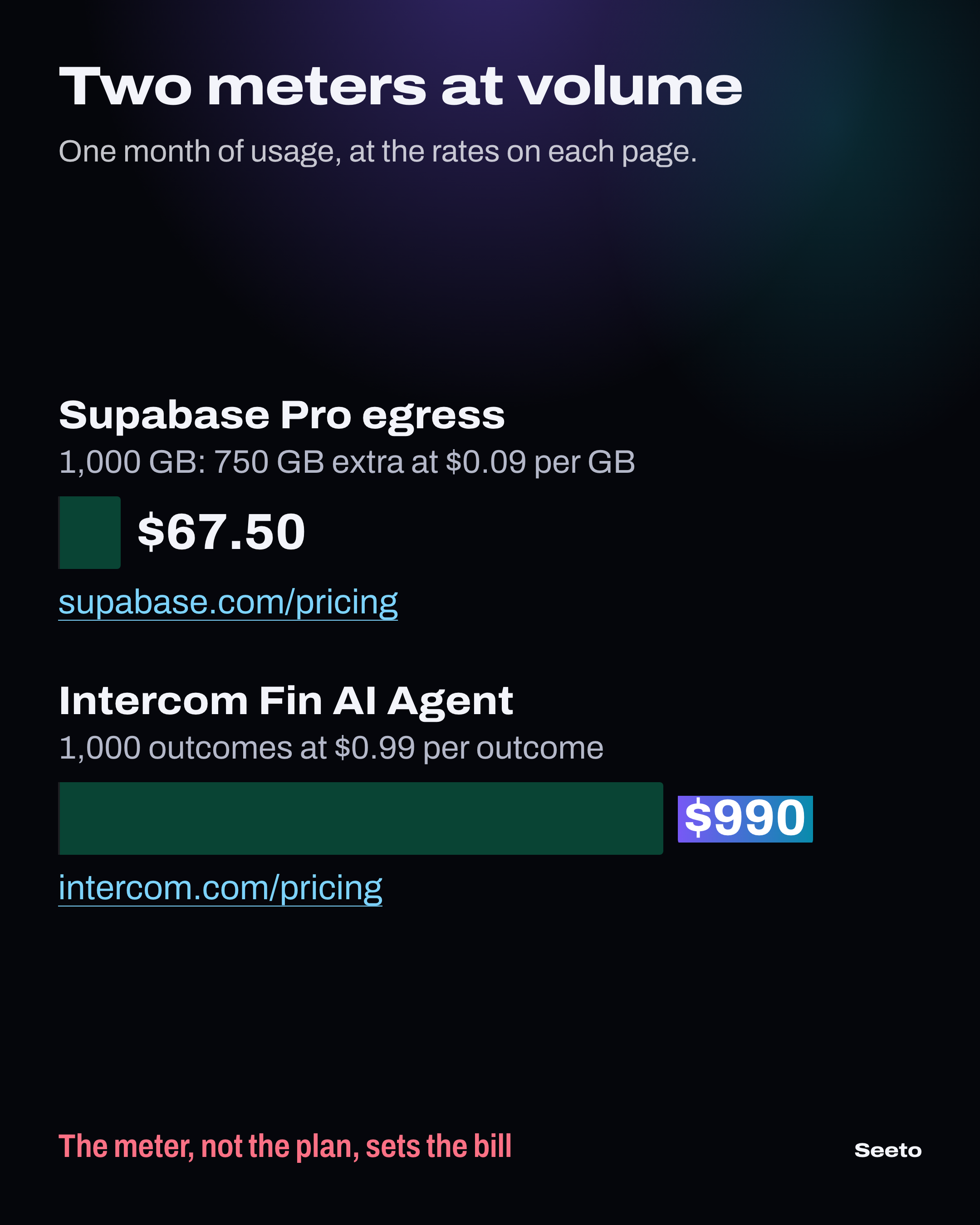
The meters themselves vary a lot. Supabase's pricing page lists Pro from $25 a month with 250 GB egress, then $0.09 per GB. Intercom's pricing page charges $0.99 per outcome for its Fin AI Agent on top of seats. Each of those lines matters more to a large account than the plan price above it.
Why most comparisons miss it
Three habits hide the overage rate from competitor research.
First, the screenshot. A screenshot of the pricing page above the fold catches the plan cards and misses the FAQ where the overage terms live. We wrote about why a screenshot is not a change record.
Second, the single column. A spreadsheet with one "price" column forces you to pick one number, and the big number wins.
Third, the date. Overage rates change quietly. A plan price change often gets an announcement; a rate change in the FAQ rarely does. If you do not keep a dated record of the page, you will not see a rate move. Our playbook for a competitor price increase covers what to do in the first week after you do see it.
How Seeto reads the overage line
Seeto solves this problem directly. You paste your URL and your competitors' URLs, and an agent reads their real pricing pages, the FAQ included. In 5 to 15 minutes you get a pricing comparison in which each plan, allowance and overage rate carries the page it came from. You can see this on the public Resend report, which compares Resend with Postmark, SendGrid, Mailgun and others.
On Pro, Seeto re-runs the analysis on a schedule and compares it with the previous run. A rate that moved from one run to the next shows as a change, with the page where it moved. That is the record the three habits above do not give you. The plans are on the pricing page.
Questions
What is an overage rate in usage-based pricing?
It is the price of each unit past the plan's allowance, such as $0.90 per 1,000 extra emails on Resend Pro. It sets what a growing customer pays.
Match their plan price or their overage?
Look at the overage first. Your buyers who grow feel the overage every month, and they feel the plan price once.
How often do competitors change overage rates?
No public count exists. A rate change rarely gets its own announcement, so a dated record of the page is the way to see it.
What if a rival hides its overage rate?
Then the overage is a sales conversation, and that is a fact too. Note it, and check the page again on each run.
Add an overage column to your competitor pricing table today, and fill it from each rival's own page. If you want the page read for you, with each rate linked to its source, run your first analysis on Seeto.