Competitor price increase: a playbook for week one
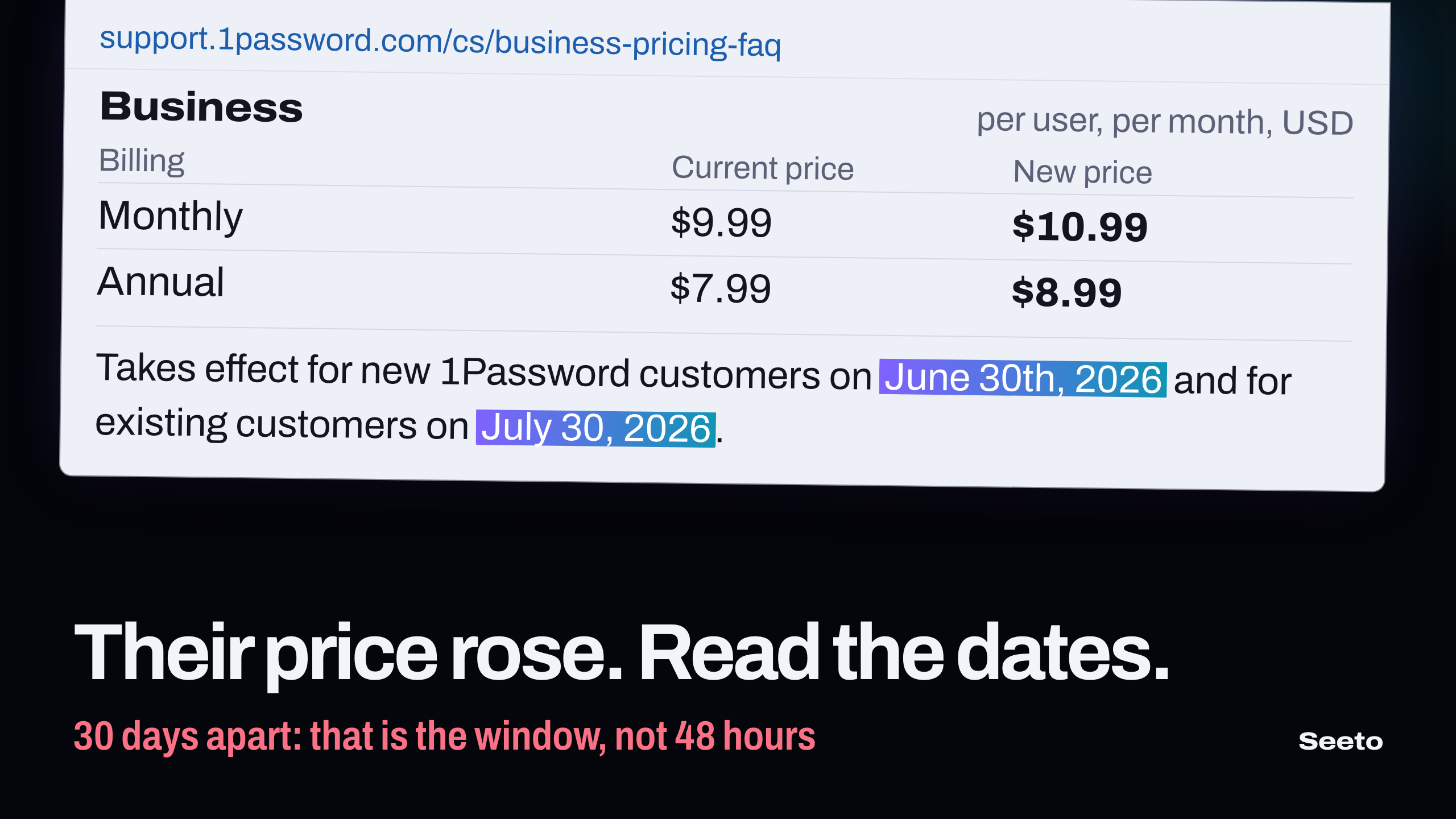
When you see a competitor price increase, do not react in 48 hours. Confirm it on their own page, write down the dates for new and for existing customers, compute the rise for each plan, and read what else the notice changed. Then give sales one page of sourced facts, and decide your own price last.
I opened five price increase notices on 21 November 2026: 1Password, Atlassian, Tability, BigMailer and Localazy. I also opened the playbook that ranks first for this search. Every date, price and percent below comes from those pages, with a link on the words that state it.
The common advice treats the event as a sprint. One popular playbook says you have approximately 48 hours to capitalize before that moment passes. The notices themselves say something else. Their customers pay the new price weeks or months after the announcement, and that date is on the page.
Confirm the competitor price increase at its source
Do not act on a forwarded email or a social post. Open the competitor's own pages and find the notice. It is usually a help-center article, a blog post or a dedicated pricing page.
- Copy the text of the notice with its address and today's date.
- Copy the old prices and the new prices, per plan, per billing period and per currency.
- Open the live pricing page and note which price it shows today.
Step 3 matters because the two pages can disagree for weeks. BigMailer's notice says its pricing page and billing pages were already updated on the day of the post. Other vendors publish the notice first and change the pricing page on the effective date.
Keep the copy as text. You will compare it with the next version, and a screenshot is not a change record. Note the currency too: 1Password lists US dollar, Canadian dollar and euro prices in one table, so check whose price you captured.
Write down the three dates
Each notice has up to three dates: the day it was published, the day new customers pay the new price, and the day existing customers pay it. The gap between the last two is the time their customers have to think.
1Password's notice says the increase takes effect for new 1Password customers on June 30th, 2026 and for existing customers on July 30, 2026. That is 30 days. The change then appears on the next renewal on or after that date, so a customer on annual billing can meet it many months later.
Tability posted its notice on 12 January 2026. New customers pay from January 19, and existing customers won't see any pricing changes until July 1, 2026. From January 19 to July 1 is 163 days.
BigMailer's new prices were in effect for new customers as of March 2, 2026. Existing customers on monthly Business plans pay on a billing period that starts after June 2nd, 2026, which is 92 days later. Agency plans follow in October 2026.
Atlassian gives no gap. Its page says new prices will go into effect October 13, 2026 PT for new purchases, renewals and upgrades alike.
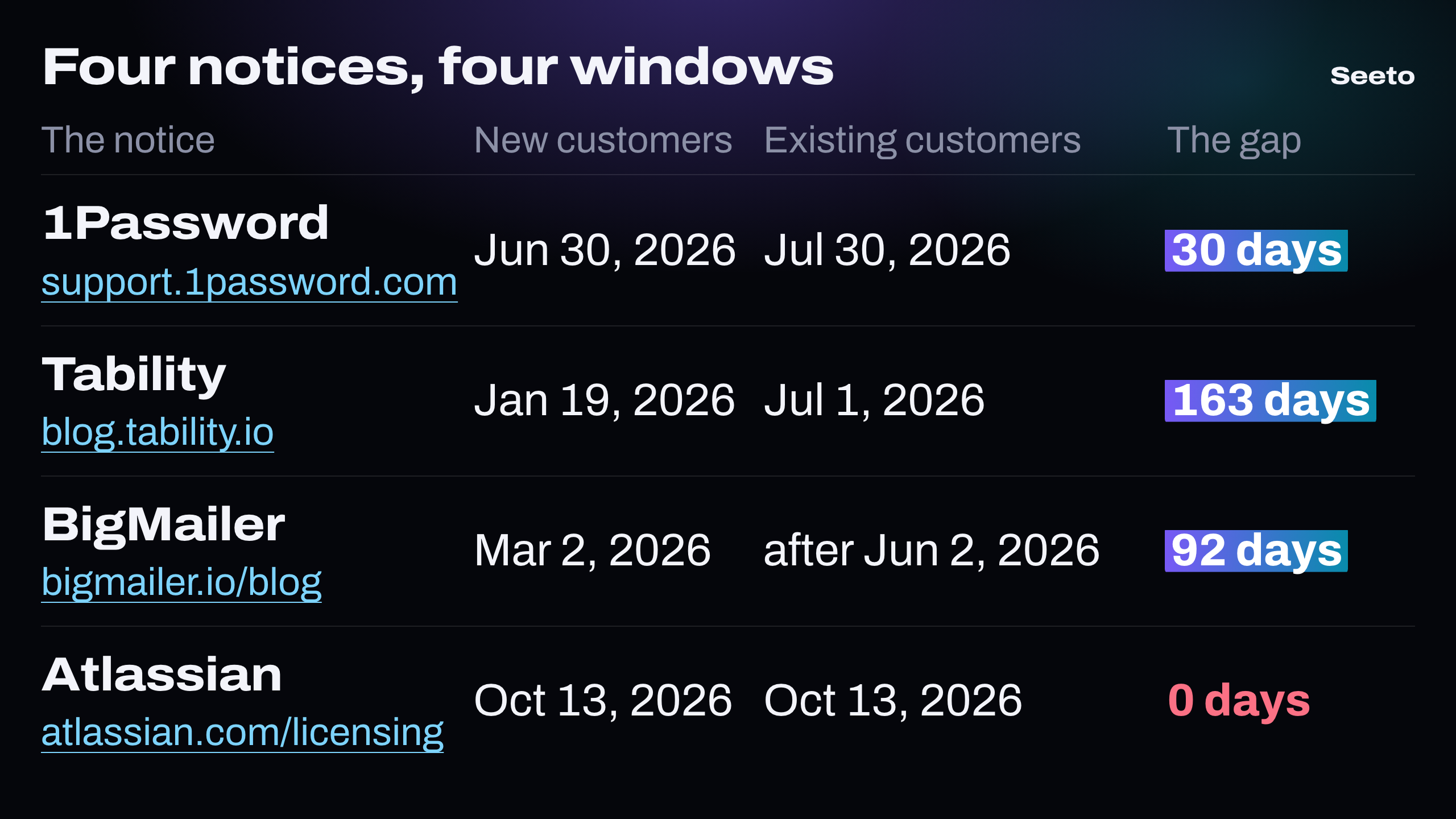
So the window is not 48 hours. It ranges from 0 to 163 days in these four notices, and it is a different length for each competitor. Put the two dates in your calendar before you write one line of outreach.
Compute the rise for each plan and size
A notice rarely says one percent for everyone. Compute it per plan, per billing period and per account size. The result shows which customers the competitor believes will stay.
Here is the worked example. Atlassian's FAQ prices Jira Cloud Standard for 450 users on monthly billing. The new prices are $9.70 for users 1 to 100, $8.20 for users 101 to 250 and $6.85 for users 251 to 450. The last price is the table's 251 to 1,000 tier. Atlassian gives the total: $3,570 a month.
The pricing tables give the old prices for the same three tiers: $9.05, $7.65 and $6.40. So the old bill was 100 × 9.05 + 150 × 7.65 + 200 × 6.40 = 905 + 1,147.50 + 1,280 = $3,332.50.
The difference is 3,570 − 3,332.50 = $237.50 a month. That is 237.50 ÷ 3,332.50 = 7.1%, or 237.50 × 12 = $2,850 a year for one 450-person account.
Now do the same for a large account. In the same table the 5,001 to 7,500 tier goes from $5.10 to $5.60, which is 0.50 ÷ 5.10 = 9.8%. The 7,501 to 10,000 tier goes from $4.80 to $5.30, which is 10.4%.
The three small tiers rise by 7.2%, 7.2% and 7.0%. So a small account pays about 7% more. Above 5,000 users the rise is about 10%.
1Password went the other way. Its Business plan on annual billing goes from $7.99 to $8.99 per user per month: 1.00 ÷ 7.99 = 12.5%. Its Teams Starter Pack on annual billing goes from $19.95 to $24.95: 5.00 ÷ 19.95 = 25%. The smallest customers got the largest percent.
These two patterns need different responses. If you sell to enterprises against Atlassian, the 10% tiers are your accounts. If you sell to ten-person teams against 1Password, the 25% plan is.
Read what else the notice changed
A price increase notice often carries changes that are not a list price. Read every numbered point.
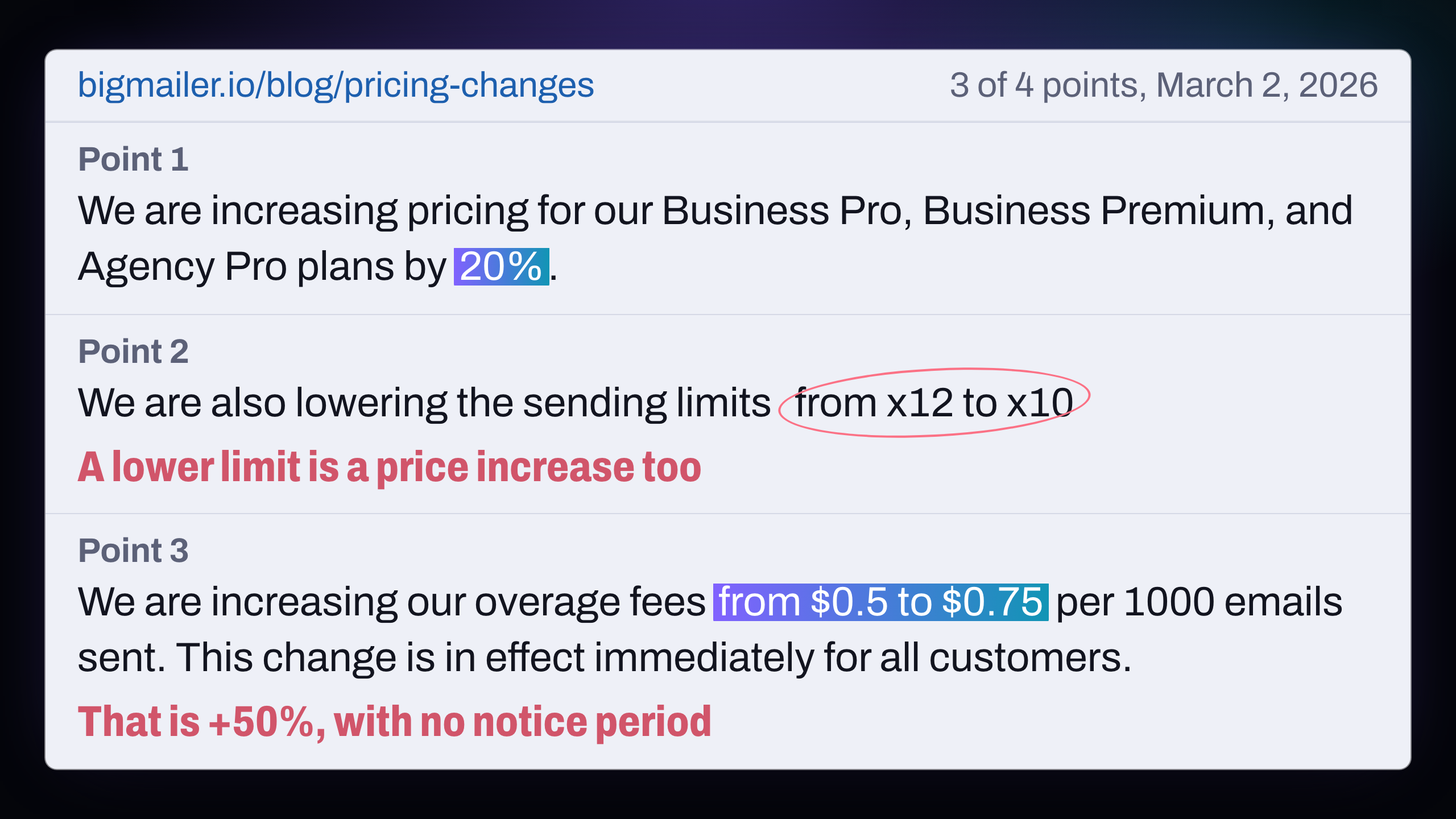
BigMailer's notice has four. The first two raise plan prices by 20% and 25%. The second point also says the company is lowering the sending limits from x12 to x10 for Business, Agency and Enterprise plans. A customer who sends the same volume now needs a higher level, so the limit cut is a second price increase.
The third point raises overage fees from $0.5 to $0.75 per 1000 emails, and it is in effect immediately for all customers. That is 0.25 ÷ 0.50 = 50%, with no notice period. The fourth doubles a dedicated IP from $50 to $100 per month.
Read the stated reason as well, because it is positioning. Atlassian says it is updating prices to reflect the latest innovations across its apps, and it names AI in four of its five examples. Localazy says that over two years all costs have increased while our pricing stayed the same, and puts the average rise at +5.4%. 1Password says the change isn't tied to any single feature or product area.
A competitor that prices on AI value has told you what its sales team will say next quarter. A competitor that prices on cost has told you nothing new about the product.
Find the lock-in offer
Most notices offer customers a way to keep the old price. That offer decides who is still open to a conversation and when.
- Tability tells existing customers they can lock in current pricing for the next 12 months by switching to an annual subscription.
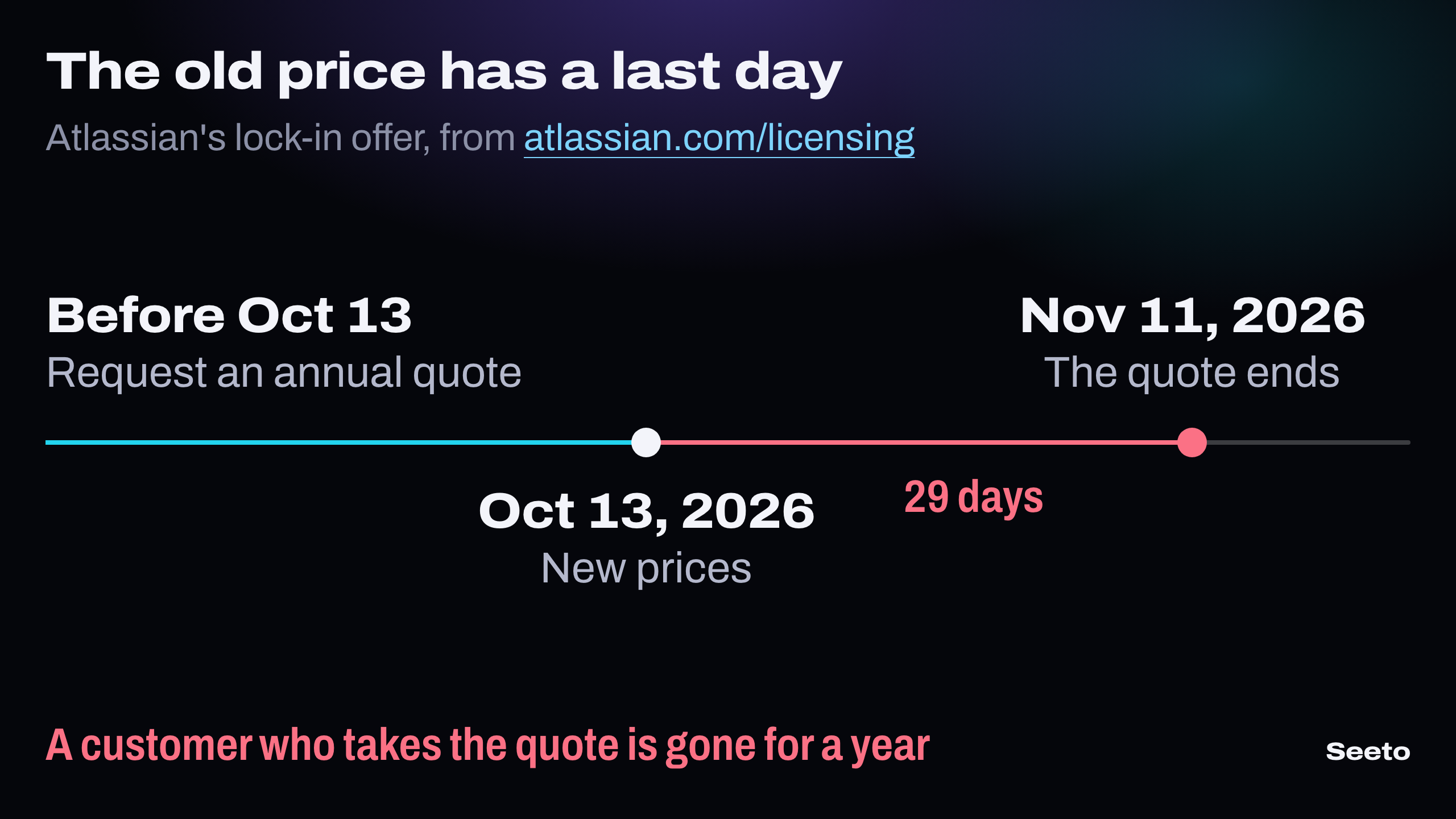
- Atlassian lets monthly customers request an annual quote before October 13, 2026 PT to receive existing pricing. The quote cannot be extended beyond November 11, 2026 PT.
- Localazy says the current pricing of annual plans is locked in until the next renewal date.
Each customer who takes the offer has signed for a year at the old price. They will not switch next month, however good your comparison is. So the lock-in offer splits their customers into two groups.
- Customers on monthly billing who have not yet locked in. Reach them between the notice and the effective date.
- Customers on annual contracts. Reach them before their renewal. Atlassian sends a renewal quote 90 days before an annual subscription expires, so start a month before that.
Ask each prospect one question: when does your contract renew? Put the answer in the CRM. It is worth more than a fast email.
Give sales one page with sources
Your sales team needs the facts in a form it can paste into a reply. Write one page per competitor.
- The old price and the new price, for the two plans you meet most often
- The percent rise for a typical account, with the arithmetic
- The date for new customers and the date for existing customers
- The lock-in offer and its last day
- The address of the notice next to each fact
State facts only. Do not write that the competitor is greedy, and do not guess its reasons. A buyer who opens the link and finds your numbers correct trusts the rest of your page. That is why every competitor claim needs a source link.
Do not answer with a discount. A discount tied to their notice tells the market your list price was soft. Offer a fixed price for the first term instead, in writing, if your margins allow it.
Decide your own price last
Two reflexes are wrong. The first is to raise your price because they raised theirs. The second is to announce that you will never raise yours.
Look at the gap, per segment. If your product was 10% cheaper than theirs for a 450-person account, their 7.1% rise makes the gap about 16%. A wider gap helps you with price-sensitive buyers and costs you nothing. Leave it alone for one quarter and measure the win rate in deals against that competitor.
If you do raise a price later, copy the parts of their notice that worked: one page, clear dates, a table of old and new prices, and a notice period of 30 days or more.
Where Seeto fits
The hard part of this playbook is step one: knowing that a price moved, on which plan, and having the old value to compare. A team that checks pricing pages by hand finds out from a customer. That is the problem Seeto solves.
You paste your URL and your competitors' URLs, and an agent reads their real pages. In 5 to 15 minutes you get a pricing comparison, a features matrix, messaging, a positioning map and battle cards. Every fact carries the page it came from, so the page for sales in this playbook starts with sourced numbers.
On the Pro plan, Seeto re-runs the analysis on a schedule and compares it with the previous run. It shows what changed and where: a plan price, a limit, a new line in the plan table. You get the old value and the new value side by side, which is the arithmetic this post asks for. The plans and their limits are on the pricing page.
Should I raise my prices when a competitor raises theirs?
Not because they did. Their notice tells you which plans rose, by how much and for whom. Compare that with your own costs and your own win and loss notes. If you change a price, change the part of your price list that their rise makes look too low, and give your customers the same notice period you would want.
How long does the window after a competitor price increase last?
It lasts from the notice to the date existing customers pay, and it opens again before each annual renewal. In the notices in this post that first window runs from 0 days (Atlassian) to 163 days (Tability).
Where do SaaS companies announce a price increase?
In four places: an email to customers, a blog post, a help-center article and the pricing page itself. Large vendors add a dedicated page with tables of the old and new prices. The help-center article usually has the dates.
Is it fair to tell prospects about a competitor's price increase?
Yes, when you state the fact and link the competitor's own page. Give the old price, the new price and the date. Add no opinion about why they did it.
Start before the next notice
Pick the competitor you meet most often in deals. Save its pricing page as text today, with the date, so you have the old values when the notice comes. Then start a free Seeto analysis with their URL and yours, and keep the pricing comparison as your baseline.